

6.2.1.3. Regularized Regression#
When a linear model has many features - especially when they are correlated or only weakly relevant - Ordinary Least Squares tends to overfit: it assigns large, noisy coefficients to chase training-set variation that does not generalise.
Regularization fixes this by adding a penalty on the magnitude of the coefficients directly to the loss function. The optimiser is now forced to balance fitting the data and keeping the coefficients small. The result is a model that is slightly biased but has much lower variance, and usually generalises much better.
There are three main variants:
Variant |
Penalty |
Key behaviour |
|---|---|---|
Ridge (L2) |
Sum of squared coefficients |
Shrinks all coefficients toward zero uniformly; none become exactly zero |
Lasso (L1) |
Sum of absolute coefficients |
Drives some coefficients to exactly zero - automatic feature selection |
Elastic Net |
Weighted L1 + L2 |
Combines both: sparse like Lasso, stable with correlated features like Ridge |
The Math#
All three regularized models minimise the same base MSE loss (as in Linear Regression), plus a penalty term controlled by the hyperparameter \(\alpha\).
Ridge (L2)#
The L2 penalty creates a smooth penalty landscape - no direction is treated differently, so all coefficients shrink together. The solution remains unique even when features are correlated.
Lasso (L1)#
The L1 penalty has sharp corners at zero in each dimension. This geometric property means the optimum frequently lands exactly on zero for some coefficients, producing sparse solutions.
Elastic Net#
l1_ratio \(\rho = 1\) recovers Lasso; \(\rho = 0\) recovers Ridge. A value like \(0.5\) gives an equal blend.
In scikit-learn#
from sklearn.linear_model import Ridge, Lasso, ElasticNet

ridge = Ridge(alpha=1.0)
lasso = Lasso(alpha=0.5, max_iter=5000)
enet  = ElasticNet(alpha=0.5, l1_ratio=0.5, max_iter=5000)
Key hyperparameters:
alpha- regularization strength; higher → stronger shrinkage (useRidgeCV/LassoCVto tune)l1_ratio(Elastic Net only) - blend between L1 and L2
Example#
ridge = Ridge(alpha=1.0)
lasso = Lasso(alpha=0.5, max_iter=5000)
enet  = ElasticNet(alpha=0.5, l1_ratio=0.5, max_iter=5000)

ridge_r2, ridge_rmse = test_stats(ridge)
lasso_r2, lasso_rmse = test_stats(lasso)
enet_r2,  enet_rmse  = test_stats(enet)

pd.DataFrame({
    "Model":     ["Ridge (α=1.0)", "Lasso (α=0.5)", "Elastic Net (α=0.5, ρ=0.5)"],
    "Test R²":   [ridge_r2, lasso_r2, enet_r2],
    "Test RMSE": [ridge_rmse, lasso_rmse, enet_rmse],
})
| Model | Test R² | Test RMSE | |
|---|---|---|---|
| 0 | Ridge (α=1.0) | 0.978 | 26.3 |
| 1 | Lasso (α=0.5) | 0.978 | 26.6 |
| 2 | Elastic Net (α=0.5, ρ=0.5) | 0.924 | 49.1 |
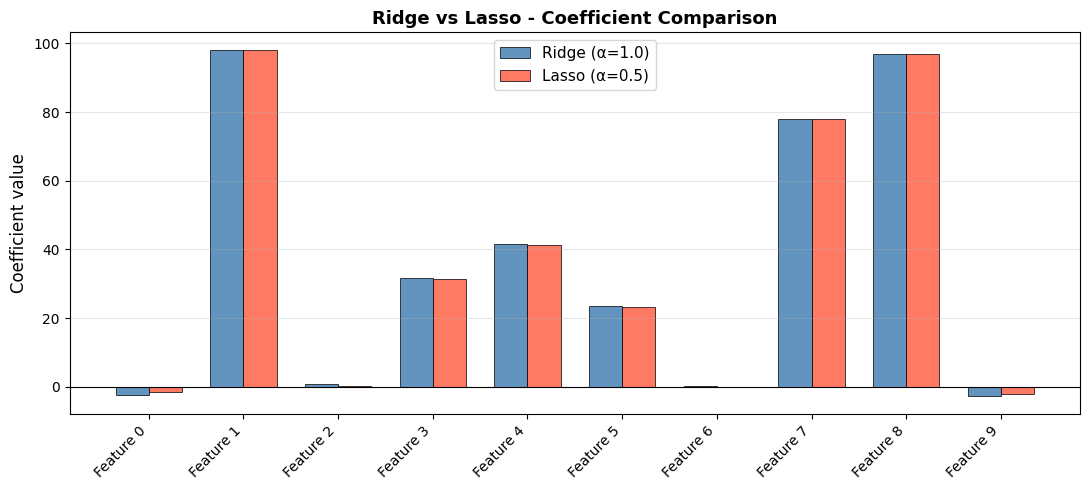
Ridge achieves \(R^2\) = 0.978, Lasso 0.978, and Elastic Net 0.924. The dataset has only 6 informative features out of 10, so Lasso’s feature-selection behaviour is particularly relevant here.
Coefficient Paths - How \(\alpha\) Changes the Solution#
As \(\alpha\) increases, more regularization is applied and all coefficients shrink. For Lasso, they hit zero one by one:
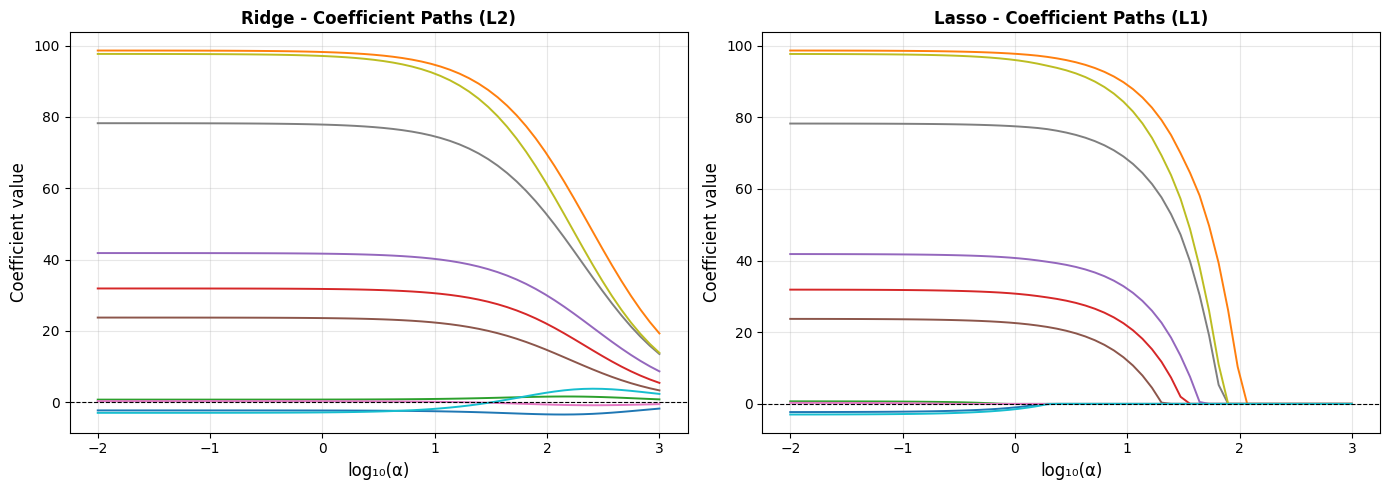
In the Ridge plot, every line smoothly approaches zero but never fully reaches it. In the Lasso plot, lines hit zero and stay there - those are features being excluded from the model entirely.
How Many Features Does Lasso Keep?#
non_zero_by_alpha = [(np.sum(lasso_coefs[i] != 0)) for i in range(len(alphas))]

plt.figure(figsize=(9, 4))
plt.plot(np.log10(alphas), non_zero_by_alpha, "o-", markersize=4, linewidth=2, color="steelblue")
plt.xlabel("log₁₀(α)", fontsize=12)
plt.ylabel("Non-zero coefficients", fontsize=12)
plt.title("Lasso - Feature Selection as α Increases", fontsize=13, fontweight="bold")
plt.grid(True, alpha=0.3)
plt.tight_layout()
plt.show()
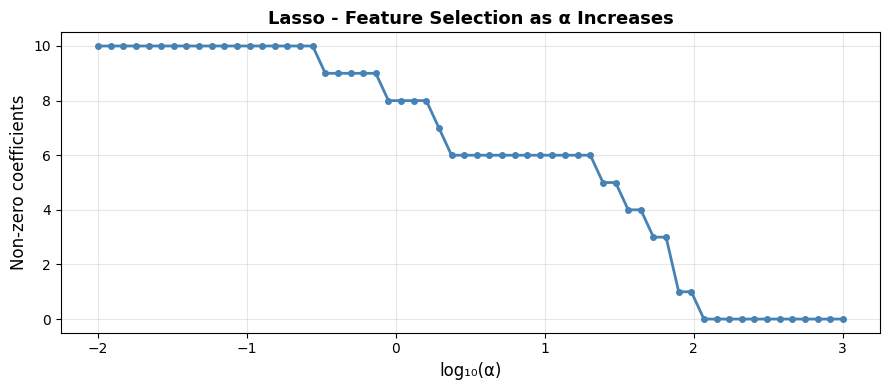
# Count non-zero coefficients in the fitted Lasso (α=0.5)
n_selected = int(np.sum(lasso.coef_ != 0))
glue("lasso-n-selected", n_selected, display=False)
With \(\alpha = 0.5\), Lasso retains 9 of the 10 features, correctly discarding most of the non-informative ones.
Ridge vs Lasso - Side-by-Side Coefficient Comparison#
Choosing Between Ridge, Lasso, and Elastic Net#
Situation |
Recommended |
|---|---|
Many features, each contributes a little |
Ridge - keeps all features, stable |
Few features truly matter (sparse signal) |
Lasso - zeroes out irrelevant features |
Correlated features + you want sparsity |
Elastic Net - handles correlations better than pure Lasso |
Unsure |
Elastic Net - safe default that interpolates between both |
Tip
Use RidgeCV, LassoCV, or ElasticNetCV to automatically select alpha via cross-validation instead of guessing.