
3.2.5.4. SQL Joins#
Now that we have learned the basics of SQL - such as tables and keys - we can move to more advanced concepts. Joins are a powerful way to connect different tables based on their relationships and retrieve a unified view of data.
Joins are used to combine related rows across tables using foreign key linkages. As a data scientist, you will often perform this step. Application databases are designed for performance and normalization, but for analysis, you usually need a combined view of multiple tables.
Let’s look at an example.
Recall our employees and departments tables:
CREATE TABLE departments (
    dept_id INTEGER PRIMARY KEY,
    dept_name TEXT NOT NULL
);

CREATE TABLE employees (
    emp_id INTEGER PRIMARY KEY,
    name TEXT NOT NULL,
    dept_id INTEGER,
    FOREIGN KEY (dept_id) REFERENCES departments(dept_id)
);
Say we want to display all employees who belong to a particular department name. Without a join, this would require two steps:
Get the
dept_idfor the department.Fetch employees with that
dept_id.
With a join, this becomes a single query:
SELECT e.name, d.dept_name
FROM employees e
INNER JOIN departments d ON e.dept_id = d.dept_id
WHERE d.dept_name = 'Engineering';
This makes filtering, aggregation, and analysis much easier. We have seen some examples in SQL Advanced Queries.
Visual Overview#
Below is a reference visualization of the different types of joins:
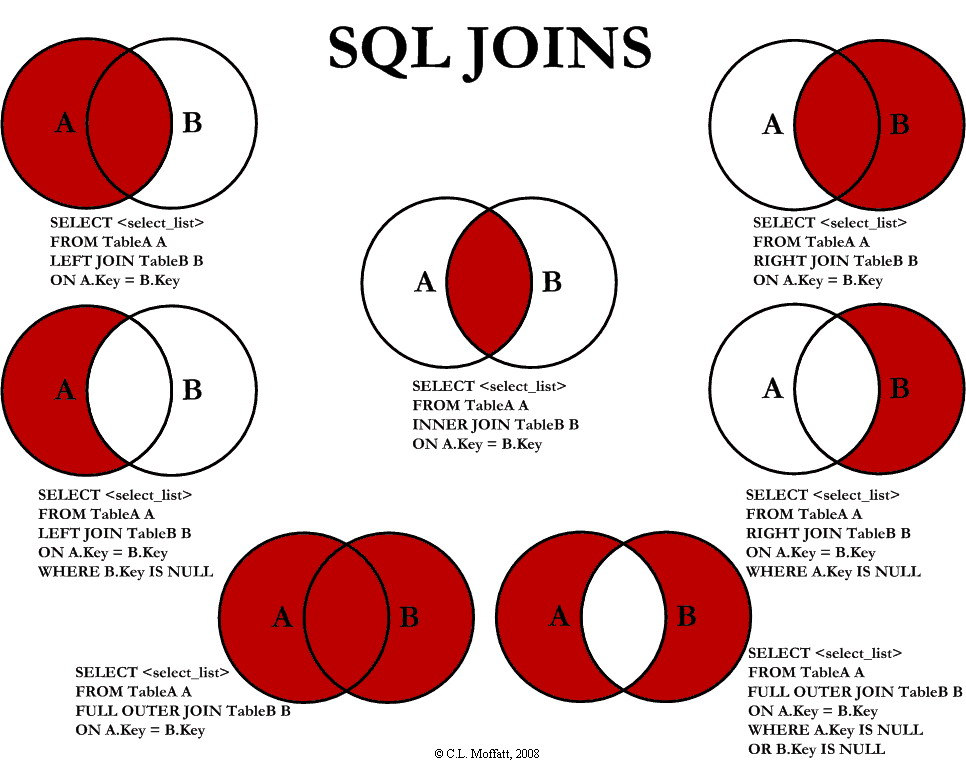
C.L. Moffatt, 2008. See the blog post here.
In the diagrams, A and B are tables. The shaded areas show which records are included.
Inner Join#
An Inner Join fetches only those records that exist in both tables with matching keys.
Example:
SELECT *
FROM A
INNER JOIN B ON A.key = B.key;
This retrieves rows where A.key matches B.key in both datasets.
Left Join#
A Left Join returns every row from the left table (A), along with matching rows from the right table (B). If there’s no match, you’ll see NULLs for the B columns.
Example:
SELECT *
FROM A
LEFT JOIN B ON A.key = B.key;
Right Join#
A Right Join works the opposite way: it includes all records from the right table (B), combined with matching records from the left table (A). If no match exists, the left side will contain NULLs.
Example:
SELECT *
FROM A
RIGHT JOIN B ON A.key = B.key;
Outer Join#
A Full Outer Join merges the results of both left and right joins. This means you get all rows from A and all rows from B, matching them where possible. When no match exists on one side, those columns will be NULL.
Example:
SELECT *
FROM A
FULL OUTER JOIN B ON A.key = B.key;
Left Excluding Inner Join#
This join returns the records only found in A without a match in B. It’s often used to identify “unmatched” or “orphaned” entries.
Example:
SELECT *
FROM A
LEFT JOIN B ON A.key = B.key
WHERE B.key IS NULL;
Right Excluding Inner Join#
Similarly, this join gives you all rows from B that don’t have a corresponding row in A.
Example:
SELECT *
FROM A
RIGHT JOIN B ON A.key = B.key
WHERE A.key IS NULL;
Outer Excluding Inner Join#
This variation gathers all records that exist only in A or only in B. In other words, everything that doesn’t overlap between the tables.
Example:
SELECT *
FROM A
FULL OUTER JOIN B ON A.key = B.key
WHERE A.key IS NULL OR B.key IS NULL;
Cross Join#
A Cross Join creates the Cartesian product of the two tables: every row from table A is combined with every row from table B. This means if Table A has m rows and Table B has n rows, the result will contain m × n rows.
While this can be useful to generate all possible combinations or to build pairs without a direct relationship, it is usually computationally expensive and often combined with a WHERE clause to filter results.
Example:
SELECT A.*, B.*
FROM A
CROSS JOIN B;
This will return all row combinations between A and B.
Alternatively, you can use this equivalent syntax (commonly in SQLite and other systems):
SELECT A.*, B.*
FROM A, B;
Tip: Always consider adding a WHERE filter if you don’t actually want the full Cartesian product.