

6.1.5. Underfitting and Overfitting#
Among all the ideas in machine learning, few are as fundamental as this one: a model must generalize.
Training data is only a sample of the world. The real test of a model is not how well it performs on what it has already seen, but how well it performs on what it has never seen before.
A model that only memorizes is useless in practice. A model that captures structure is valuable.
You can think of it in human terms:
A student who memorizes practice problems often fails the exam.
A student who understands principles can solve new problems.
Machine learning faces the same tension.
6.1.5.1. The Central Problem#
Every supervised learning task involves two goals that pull in opposite directions:
Fit the training data well.
Perform well on new data.
If we push too hard on the first goal, we risk memorization. If we do not push hard enough, we risk missing the signal entirely.
To make this concrete, we generate data from a curved function and split it into training and test sets.
This dataset contains a real quadratic pattern plus noise. The question is: how complex should our model be?
6.1.5.2. Underfitting#
Underfitting occurs when a model is too simple to capture the underlying structure of the data.
In this case, we fit a linear model to data that is clearly curved.
model_underfit = make_pipeline(PolynomialFeatures(1), LinearRegression())
model_underfit.fit(X_train, y_train)

train_score = model_underfit.score(X_train, y_train)
test_score = model_underfit.score(X_test, y_test)
train_mse = mean_squared_error(y_train, model_underfit.predict(X_train))
test_mse = mean_squared_error(y_test, model_underfit.predict(X_test))

X_plot = np.linspace(0, 10, 200).reshape(-1, 1)
y_pred_plot = model_underfit.predict(X_plot)
y_true_plot = true_function(X_plot.ravel())
Training R²: 0.308 Test R²: 0.334
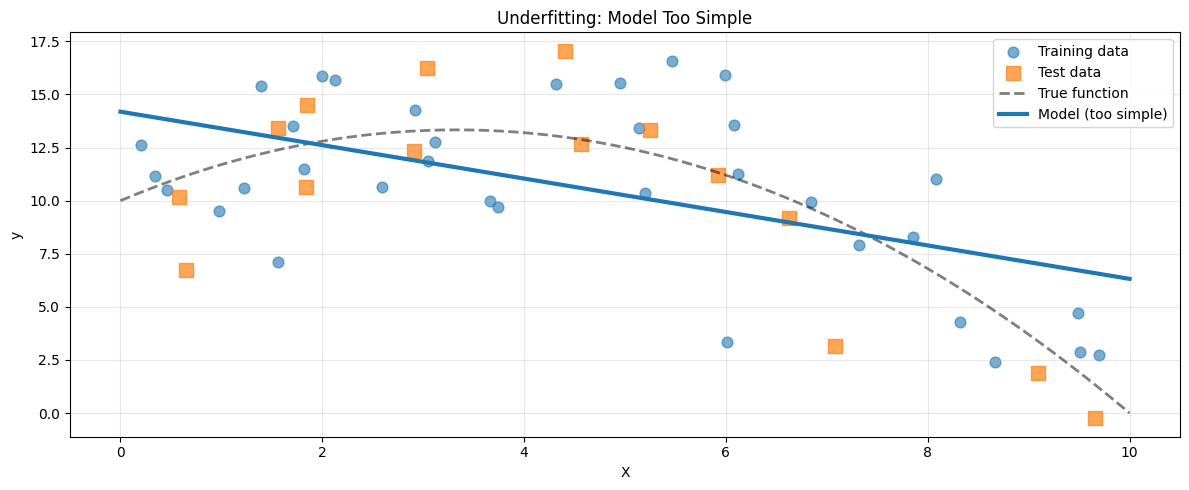
The straight line cannot represent curvature. Both training and test performance are poor.
Hallmarks of Underfitting#
High training error
High test error
Small gap between training and test
Model systematically misses the pattern
Underfitting is a capacity problem. The model simply lacks the expressive power to represent the true relationship.
Common causes include:
Insufficient model complexity
Missing or weak features
Excessive regularization
Inadequate training
6.1.5.3. Overfitting#
Overfitting occurs when a model is too complex and begins to model noise rather than structure.
Now we fit a high degree polynomial.
model_overfit = make_pipeline(PolynomialFeatures(15), LinearRegression())
model_overfit.fit(X_train, y_train)

train_score_over = model_overfit.score(X_train, y_train)
test_score_over = model_overfit.score(X_test, y_test)

y_pred_plot_over = model_overfit.predict(X_plot)
Training R²: 0.614 Test R²: 0.704
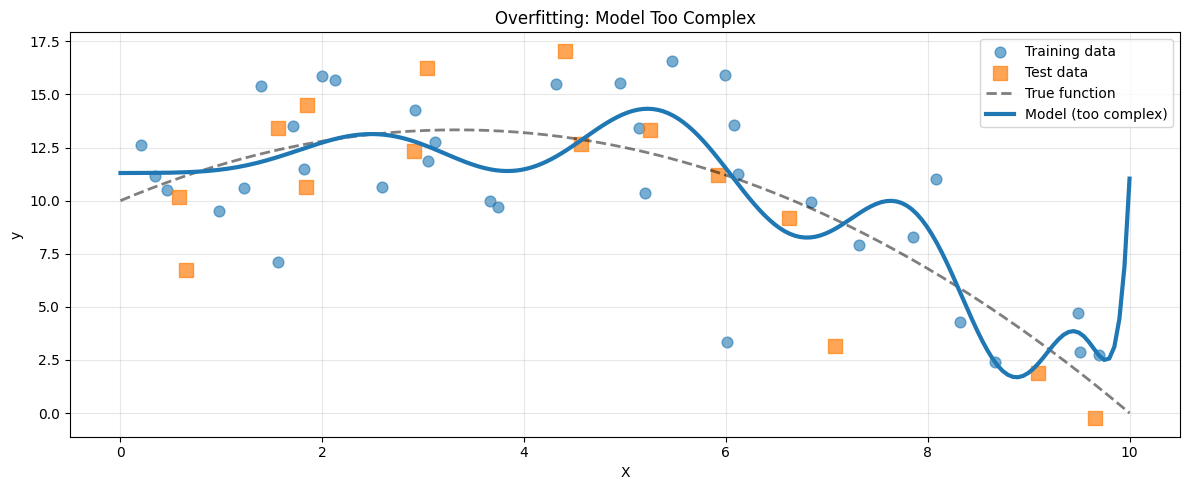
The model fits the training data extremely well. But between points, it oscillates wildly. The test score drops.
Hallmarks of Overfitting#
Very low training error
High test error
Large gap between training and test
Unstable or erratic predictions
Overfitting is a variance problem. The model adapts too closely to random fluctuations in the training data.
Common causes include:
Excessive model complexity
Too little training data
Lack of regularization
Training for too long
6.1.5.4. The Sweet Spot#
The goal is neither simplicity nor complexity for its own sake. The goal is alignment between model capacity and data structure.
Here we fit a quadratic model, matching the true function.
model_justright = make_pipeline(PolynomialFeatures(2), LinearRegression())
model_justright.fit(X_train, y_train)

train_score_jr = model_justright.score(X_train, y_train)
test_score_jr = model_justright.score(X_test, y_test)
Training R²: 0.544 Test R²: 0.693 Gap: 0.150
Both scores are strong. The gap is small. The model captures structure without memorizing noise.
This is the balance we seek.
6.1.5.5. The Diagnostic Curve#
If we increase model complexity gradually and track performance, a clear pattern emerges.
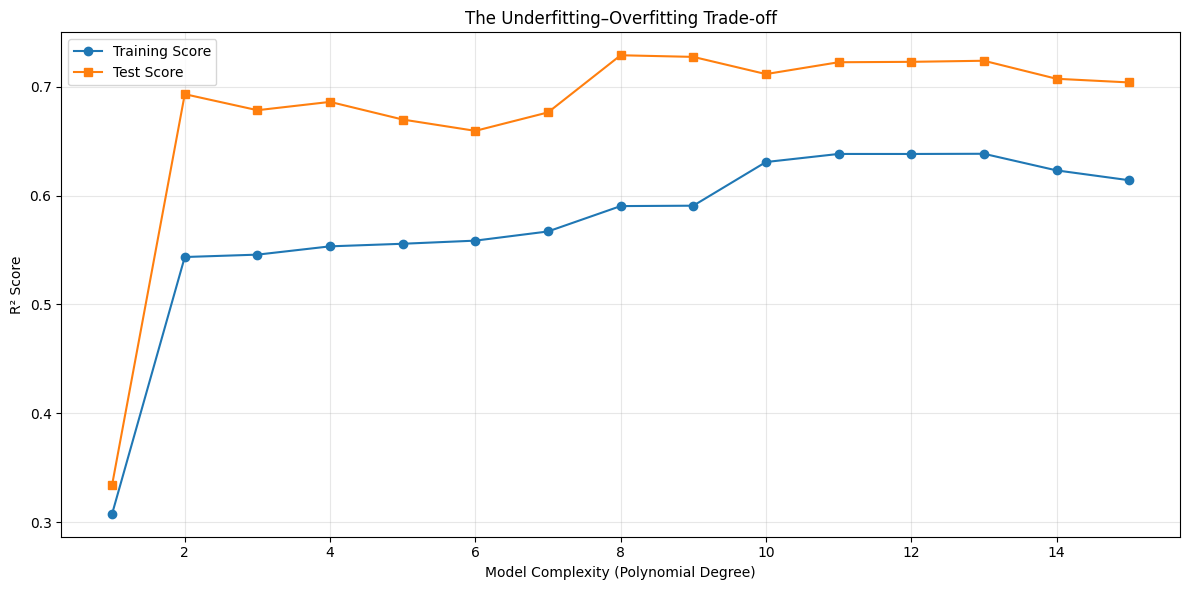
Two universal patterns appear:
Training performance improves monotonically with complexity.
Test performance improves, peaks, and then declines.
The peak of the test curve marks the optimal level of complexity.
6.1.5.6. Learning Curves: Another Diagnostic Tool#
So far, we have studied performance as a function of model complexity. There is another equally powerful perspective: performance as a function of data size.
A learning curve shows how training and validation performance change as we provide the model with more data. Instead of asking, “Is my model too complex?”, we ask, “Do I have enough data?”
Traceback (most recent call last):
  File "/home/runner/.local/share/uv/python/cpython-3.13.12-linux-x86_64-gnu/lib/python3.13/multiprocessing/resource_tracker.py", line 371, in main
    raise ValueError(
        f'Cannot register {name} for automatic cleanup: '
        f'unknown resource type {rtype}')
ValueError: Cannot register /dev/shm/joblib_memmapping_folder_3150_8c60ca7b33b74ec3bec1fb7e305eb24f_ae91f4dc8f6740a589c537855d1879d7 for automatic cleanup: unknown resource type folder
Traceback (most recent call last):
  File "/home/runner/.local/share/uv/python/cpython-3.13.12-linux-x86_64-gnu/lib/python3.13/multiprocessing/resource_tracker.py", line 371, in main
    raise ValueError(
        f'Cannot register {name} for automatic cleanup: '
        f'unknown resource type {rtype}')
ValueError: Cannot register /loky-3150-brtct1id for automatic cleanup: unknown resource type semlock
Traceback (most recent call last):
  File "/home/runner/.local/share/uv/python/cpython-3.13.12-linux-x86_64-gnu/lib/python3.13/multiprocessing/resource_tracker.py", line 371, in main
    raise ValueError(
        f'Cannot register {name} for automatic cleanup: '
        f'unknown resource type {rtype}')
ValueError: Cannot register /loky-3150-iaefh_ml for automatic cleanup: unknown resource type semlock
Traceback (most recent call last):
  File "/home/runner/.local/share/uv/python/cpython-3.13.12-linux-x86_64-gnu/lib/python3.13/multiprocessing/resource_tracker.py", line 371, in main
    raise ValueError(
        f'Cannot register {name} for automatic cleanup: '
        f'unknown resource type {rtype}')
ValueError: Cannot register /loky-3150-rbj0fquc for automatic cleanup: unknown resource type semlock
Traceback (most recent call last):
  File "/home/runner/.local/share/uv/python/cpython-3.13.12-linux-x86_64-gnu/lib/python3.13/multiprocessing/resource_tracker.py", line 371, in main
    raise ValueError(
        f'Cannot register {name} for automatic cleanup: '
        f'unknown resource type {rtype}')
ValueError: Cannot register /loky-3150-2r9kb5d0 for automatic cleanup: unknown resource type semlock
Traceback (most recent call last):
  File "/home/runner/.local/share/uv/python/cpython-3.13.12-linux-x86_64-gnu/lib/python3.13/multiprocessing/resource_tracker.py", line 371, in main
    raise ValueError(
        f'Cannot register {name} for automatic cleanup: '
        f'unknown resource type {rtype}')
ValueError: Cannot register /loky-3150-l_8d8i3o for automatic cleanup: unknown resource type semlock
Traceback (most recent call last):
  File "/home/runner/.local/share/uv/python/cpython-3.13.12-linux-x86_64-gnu/lib/python3.13/multiprocessing/resource_tracker.py", line 371, in main
    raise ValueError(
        f'Cannot register {name} for automatic cleanup: '
        f'unknown resource type {rtype}')
ValueError: Cannot register /loky-3150-uk2pf0o4 for automatic cleanup: unknown resource type semlock
Traceback (most recent call last):
  File "/home/runner/.local/share/uv/python/cpython-3.13.12-linux-x86_64-gnu/lib/python3.13/multiprocessing/resource_tracker.py", line 371, in main
    raise ValueError(
        f'Cannot register {name} for automatic cleanup: '
        f'unknown resource type {rtype}')
ValueError: Cannot register /dev/shm/joblib_memmapping_folder_3150_8c60ca7b33b74ec3bec1fb7e305eb24f_c8dbb8caadef434a837fa63ab2861277 for automatic cleanup: unknown resource type folder
Traceback (most recent call last):
  File "/home/runner/.local/share/uv/python/cpython-3.13.12-linux-x86_64-gnu/lib/python3.13/multiprocessing/resource_tracker.py", line 371, in main
    raise ValueError(
        f'Cannot register {name} for automatic cleanup: '
        f'unknown resource type {rtype}')
ValueError: Cannot register /loky-3150-1994eyu0 for automatic cleanup: unknown resource type semlock
Traceback (most recent call last):
  File "/home/runner/.local/share/uv/python/cpython-3.13.12-linux-x86_64-gnu/lib/python3.13/multiprocessing/resource_tracker.py", line 371, in main
    raise ValueError(
        f'Cannot register {name} for automatic cleanup: '
        f'unknown resource type {rtype}')
ValueError: Cannot register /loky-3150-hgp3646l for automatic cleanup: unknown resource type semlock
Traceback (most recent call last):
  File "/home/runner/.local/share/uv/python/cpython-3.13.12-linux-x86_64-gnu/lib/python3.13/multiprocessing/resource_tracker.py", line 371, in main
    raise ValueError(
        f'Cannot register {name} for automatic cleanup: '
        f'unknown resource type {rtype}')
ValueError: Cannot register /dev/shm/joblib_memmapping_folder_3150_8c60ca7b33b74ec3bec1fb7e305eb24f_c8dbb8caadef434a837fa63ab2861277 for automatic cleanup: unknown resource type folder
Traceback (most recent call last):
  File "/home/runner/.local/share/uv/python/cpython-3.13.12-linux-x86_64-gnu/lib/python3.13/multiprocessing/resource_tracker.py", line 371, in main
    raise ValueError(
        f'Cannot register {name} for automatic cleanup: '
        f'unknown resource type {rtype}')
ValueError: Cannot register /dev/shm/joblib_memmapping_folder_3150_5ea3a98ea7dd4cfd947dad6f7ab1d8e7_e63264b6fe42491a9ff83aede88f0f0e for automatic cleanup: unknown resource type folder
Traceback (most recent call last):
  File "/home/runner/.local/share/uv/python/cpython-3.13.12-linux-x86_64-gnu/lib/python3.13/multiprocessing/resource_tracker.py", line 371, in main
    raise ValueError(
        f'Cannot register {name} for automatic cleanup: '
        f'unknown resource type {rtype}')
ValueError: Cannot register /dev/shm/joblib_memmapping_folder_3150_8c60ca7b33b74ec3bec1fb7e305eb24f_e0e0eeb3def741789e55e88fd09b431b for automatic cleanup: unknown resource type folder
Traceback (most recent call last):
  File "/home/runner/.local/share/uv/python/cpython-3.13.12-linux-x86_64-gnu/lib/python3.13/multiprocessing/resource_tracker.py", line 371, in main
    raise ValueError(
        f'Cannot register {name} for automatic cleanup: '
        f'unknown resource type {rtype}')
ValueError: Cannot register /dev/shm/joblib_memmapping_folder_3150_8c60ca7b33b74ec3bec1fb7e305eb24f_e0e0eeb3def741789e55e88fd09b431b for automatic cleanup: unknown resource type folder
Traceback (most recent call last):
  File "/home/runner/.local/share/uv/python/cpython-3.13.12-linux-x86_64-gnu/lib/python3.13/multiprocessing/resource_tracker.py", line 371, in main
    raise ValueError(
        f'Cannot register {name} for automatic cleanup: '
        f'unknown resource type {rtype}')
ValueError: Cannot register /dev/shm/joblib_memmapping_folder_3150_352c5177b16d46fdb91690c232e3796c_f55837443dfe4643a43c98d9fac8cdba for automatic cleanup: unknown resource type folder
Traceback (most recent call last):
  File "/home/runner/.local/share/uv/python/cpython-3.13.12-linux-x86_64-gnu/lib/python3.13/multiprocessing/resource_tracker.py", line 371, in main
    raise ValueError(
        f'Cannot register {name} for automatic cleanup: '
        f'unknown resource type {rtype}')
ValueError: Cannot register /dev/shm/joblib_memmapping_folder_3150_8c60ca7b33b74ec3bec1fb7e305eb24f_1e781cde2a064a64968f05c858849922 for automatic cleanup: unknown resource type folder
Traceback (most recent call last):
  File "/home/runner/.local/share/uv/python/cpython-3.13.12-linux-x86_64-gnu/lib/python3.13/multiprocessing/resource_tracker.py", line 371, in main
    raise ValueError(
        f'Cannot register {name} for automatic cleanup: '
        f'unknown resource type {rtype}')
ValueError: Cannot register /dev/shm/joblib_memmapping_folder_3150_8c60ca7b33b74ec3bec1fb7e305eb24f_1e781cde2a064a64968f05c858849922 for automatic cleanup: unknown resource type folder
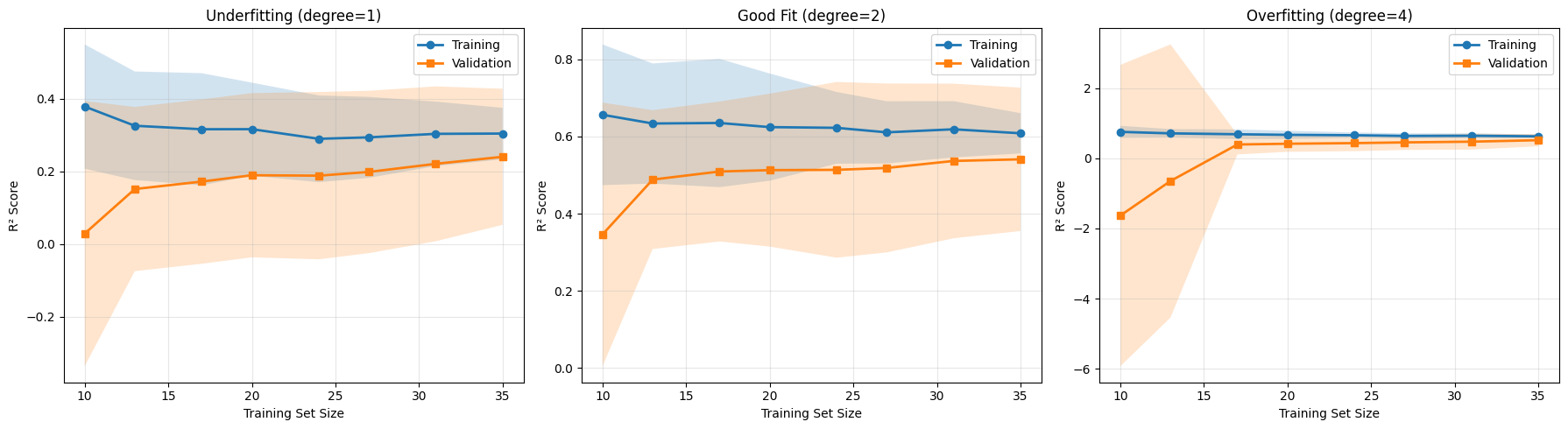
A learning curve reveals not only performance, but also why performance behaves the way it does.
Interpreting Learning Curves#
Underfitting
Training and validation scores are both low
The curves converge quickly
Adding more data does not significantly improve performance
The model lacks sufficient capacity. More data cannot fix a model that is fundamentally too simple.
Good Fit
Both curves converge to a high score
The gap between them is small
Performance improves gradually with more data
The model is well matched to the problem. Additional data may still yield incremental gains.
Overfitting
Training score is high
Validation score is substantially lower
The gap narrows as more data is added
This pattern signals high variance. The model is too sensitive to individual training examples. In this case, more data can genuinely help.
Learning curves therefore answer an important practical question: Is my problem due to model complexity, or data quantity?
6.1.5.7. Practical Example: Real Dataset#
To see that these principles extend beyond synthetic examples, consider a real regression problem using the California Housing dataset.
from sklearn.datasets import fetch_california_housing
from sklearn.tree import DecisionTreeRegressor
import pandas as pd

housing = fetch_california_housing()
X_house = housing.data[:400]
y_house = housing.target[:400]

X_h_train, X_h_test, y_h_train, y_h_test = train_test_split(
    X_house, y_house, test_size=0.3, random_state=42
)
We train decision trees with increasing depth. Tree depth directly controls complexity: shallow trees are simple, deep trees are expressive.
depths = [1, 3, 5, 10, 20, None]
results = []

for depth in depths:
    model = DecisionTreeRegressor(max_depth=depth, random_state=42)
    model.fit(X_h_train, y_h_train)

    train_score = model.score(X_h_train, y_h_train)
    test_score = model.score(X_h_test, y_h_test)
    gap = abs(train_score - test_score)

    depth_str = str(depth) if depth else "∞"
    status = "Underfit" if train_score < 0.7 and test_score < 0.7 else \
             "Overfit" if gap > 0.15 else "Good"

    results.append({
        'depth': depth_str,
        'train': train_score,
        'test': test_score,
        'gap': gap,
        'status': status
    })

df_results = pd.DataFrame(results)
df_results
| depth | train | test | gap | status | |
|---|---|---|---|---|---|
| 0 | 1 | 0.530951 | 0.446194 | 0.084757 | Underfit |
| 1 | 3 | 0.786806 | 0.654873 | 0.131933 | Good |
| 2 | 5 | 0.930228 | 0.667421 | 0.262807 | Overfit |
| 3 | 10 | 0.993562 | 0.684156 | 0.309406 | Overfit |
| 4 | 20 | 1.000000 | 0.655484 | 0.344516 | Overfit |
| 5 | ∞ | 1.000000 | 0.655484 | 0.344516 | Overfit |
As depth increases, the familiar pattern reappears:
Very shallow trees underfit
Extremely deep trees overfit
Intermediate depths generalize best
The phenomenon is not tied to polynomial regression. It is structural to supervised learning itself.
6.1.5.8. How to Fix Underfitting and Overfitting#
When you diagnose underfitting, consider:
Increasing model complexity
Adding more informative features
Reducing regularization
Training longer if optimization is incomplete
When you diagnose overfitting, consider:
Reducing model complexity
Adding regularization
Gathering more data
Using early stopping
Performing feature selection
Each intervention adjusts either model capacity or effective variance.