Project 0: Environment Setup and Dataset Selection
| Weight | Pass / Fail (not weighted in grade table; failure to submit = one letter penalty) |
| Released | Friday, August 21, 2026 |
| Due | Friday, September 4, 2026 at 11:59 PM |
Project 0 sets up everything the semester-long project sequence depends on. You will stand up a local development environment with SQLite, DuckDB, and Python managed by uv, select the dataset you will work with through the Final Project, and create the private GitHub repository that carries every submission. SQLite ships inside Python’s standard library and needs no separate install.
PostgreSQL is optional in Project 0, and nothing here requires you to install a database server. If you want to opt in now, use the department’s CISE PostgreSQL service described in Optional: CISE PostgreSQL below. More class PostgreSQL resources come later in the semester.
This project is the lightest of the semester by design. Use the time to read the syllabus, work the first few practice problems, and avoid a frantic week-2 catch-up.
Contents
- Documentation
- Repository Setup
- Dataset Selection
- Required Repository Contents
- Optional: CISE PostgreSQL
- Submission
- Grading
- FAQ
- Errata
Documentation
Bookmark the official documentation now. You will live in these pages all semester.
- DuckDB documentation
- Python
sqlite3module, which wraps the SQLite documentation - PostgreSQL documentation
- Apache Parquet documentation, background for the README’s format writeup
- uv documentation, with the course’s own Introduction to uv and pyproject.toml as the place to start
- python-dotenv documentation for the
.envconvention; in this projectuv run --env-file .envdoes the loading, so the package itself is not a dependency
Repository Setup
- Create a new private GitHub repository on your own account named exactly
cop5725fa26-project. - Under Settings → Collaborators, add
cegme(instructor) andrkc8626(TA, Ray Chen) as Admins. - Push your initial commit.
- Register the repo URL via the Canvas Project 0 assignment.
The repo URL is your project handle for the entire semester. Use the same repo for Projects 1, 2, 3, and Final.
Dataset Selection
Browse the datasets page for descriptions of each dataset family, then select yours by the first letter of your last name:
| Last name starts with | Dataset family | You pick the slice |
|---|---|---|
| A–E | NYC Taxi (TLC Trip Records) | any 2024 month, yellow or green |
| F–J | IMDb non-commercial | any genre |
| K–O | Hacker News | any year, 2020–2025 |
| P–T | OpenAlex | any field of study |
| U–Z | US Census | any state or survey table |
Classmates may land in the same family; the slice you pick keeps your work your own. If the assigned family genuinely doesn’t fit your interests, propose an alternative dataset by email (subject line including cop5725fa26). Approval is required before you commit your time.
Getting an OpenAlex slice
How to sample OpenAlex through the API (P–T family, click to expand)
Do not download the full snapshot; it is roughly 750 GB compressed. The REST API serves the same records and needs no key or login.
Your slice is one field of study. Browse the 26 fields at api.openalex.org/fields; each has a numeric ID, such as fields/17 for Computer Science.
Check the size of a slice before you choose it. The query below reports about 729,000 works in meta.count (Computer Science, 2024). Adding or removing filters like publication_year changes the count.
https://api.openalex.org/works?filter=primary_topic.field.id:fields/17,publication_year:2024&per_page=1
The sample and seed parameters return a random subset that is identical on every run, which satisfies the reproducibility rule for data/sample.csv. The script below pulls a seeded 1000-work sample and flattens it to CSV. Adapt the field ID, year, and select columns to your slice, and record the exact URL and seed in data/source.md.
# fetch_sample.py -- regenerates data/sample.csv; the URL records the exact slice
import json
import urllib.request

import pandas as pd

BASE = ("https://api.openalex.org/works"
        "?filter=primary_topic.field.id:fields/17,publication_year:2024"
        "&sample=1000&seed=5725&per_page=200"
        "&select=id,title,publication_year,cited_by_count,type,language")

rows = []
for page in range(1, 6):
    with urllib.request.urlopen(f"{BASE}&page={page}") as response:
        rows += json.load(response)["results"]
pd.DataFrame(rows).to_csv("data/sample.csv", index=False)
print(f"wrote {len(rows)} rows to data/sample.csv")
Run it with uv run fetch_sample.py; pandas is already in your pyproject.toml. Later projects can pull larger slices with cursor paging. The referenced_works field lists each work’s citations, which you will use for recursive queries later in the course. A free API key raises the daily request budget; this project needs only five requests, well under the keyless limit.
Required Repository Contents
By the deadline, your repo’s main branch must contain:
cop5725fa26-project/
├── README.md
├── pyproject.toml
├── data/
│   ├── source.md       # where the raw data lives + license
│   └── sample.csv      # or sample.parquet — first 1000 rows
├── setup/
│   └── verify.py       # runs the four-check script
├── .env.example        # template env vars; copy to .env locally
└── .gitignore          # must list .env and .venv/
README.md
At minimum:
- Your name and program
- Dataset family and the slice you selected, and why it interests you
- Local install commands you used
- A short paragraph on the Parquet file format: what it is, how it differs from CSV, and when you would choose each
- One or two sentences on things you could imagine doing with the data. This is brainstorming, not a commitment; the later project specs will shape the actual work.
data/source.md
- The exact URL or instruction to fetch the raw data
- The license (Creative Commons, public domain, etc.)
- Approximate row count and table count
- How frequently the source updates
data/sample.csv
The first 1000 rows of your dataset. This must be reproducible — anyone with data/source.md and setup/verify.py should be able to regenerate it.
pyproject.toml
Created by uv init. The base dependencies are duckdb and pandas; psycopg lives behind an optional extra so the verify script runs without it:
[project]
name = "cop5725fa26-project"
version = "0.1.0"
requires-python = ">=3.11"
dependencies = [
    "duckdb",
    "pandas",
]

[project.optional-dependencies]
postgres = ["psycopg[binary]"]
uv add duckdb pandas followed by uv add --optional postgres "psycopg[binary]" produces this layout. uv init also adds fields like authors, readme, and a build system; keep them.
.env.example
Machine-specific or secret configuration belongs in environment variables rather than in code. The convention you will use all semester is a committed template named .env.example, with your real values in a local .env that git never sees.
# Copy to .env and fill in real values. Never commit .env.
DATABASE_URL=postgresql://user:password@localhost:5432/cop5725fa26
Run cp .env.example .env, edit the values, and confirm .env appears in .gitignore. Load it for any command with uv run --env-file .env ....
setup/verify.py
Runs four required checks, plus an optional PostgreSQL check that only runs when DATABASE_URL is set. Exits with code 0 if all pass. Run it from the repo root, since the DuckDB check reads your sample file.
Run the required checks with uv run setup/verify.py. To opt in to the PostgreSQL check, put your connection string in .env and run uv run --env-file .env --extra postgres setup/verify.py. The extra pulls in psycopg[binary], so the base environment never needs psycopg or a local libpq.
# setup/verify.py
import sys
from pathlib import Path

def check_uv():
    """Confirm the uv package manager is installed and on PATH."""
    import shutil
    assert shutil.which("uv"), "uv not on PATH"
    print("uv: OK")

def check_python_packages():
    """Confirm the base dependencies from pyproject.toml import cleanly."""
    import duckdb, pandas
    print("duckdb, pandas: OK")

def check_sqlite():
    """Round-trip a small table through Python's built-in SQLite."""
    import sqlite3
    conn = sqlite3.connect(":memory:")
    conn.execute("CREATE TABLE t (x INTEGER)")
    conn.executemany("INSERT INTO t VALUES (?)", [(1,), (2,), (3,)])
    n = conn.execute("SELECT count(*) FROM t").fetchone()[0]
    conn.close()
    assert n == 3, n
    print(f"SQLite: OK (version {sqlite3.sqlite_version})")

def check_duckdb():
    """Query the committed sample file with DuckDB and count its rows."""
    import duckdb
    sample = next(
        (p for p in ("data/sample.csv", "data/sample.parquet") if Path(p).exists()),
        None,
    )
    assert sample, "data/sample.csv or data/sample.parquet not found"
    rows = duckdb.sql(f"SELECT count(*) FROM '{sample}'").fetchone()[0]
    assert rows >= 100, f"expected at least 100 rows in {sample}, found {rows}"
    print(f"DuckDB: OK ({rows} rows in {sample})")

def check_postgres_optional():
    """Test the PostgreSQL connection in DATABASE_URL; skip when unset."""
    import os
    url = os.environ.get("DATABASE_URL")
    if not url:
        print("PostgreSQL: skipped (optional; class resources come later)")
        return
    import psycopg
    with psycopg.connect(url) as conn:
        v = conn.execute("SELECT version()").fetchone()[0]
    print(f"PostgreSQL: OK ({v.split(',')[0]})")

if __name__ == "__main__":
    try:
        check_uv()
        check_python_packages()
        check_sqlite()
        check_duckdb()
        check_postgres_optional()
    except Exception as e:
        print(f"FAIL: {e}", file=sys.stderr)
        sys.exit(1)
    print("All checks passed.")
Optional: CISE PostgreSQL
The opt-in PostgreSQL check should run against the department’s hosted service, not a server on your laptop.
- Sign in with your GatorLink at register.cise.ufl.edu/databases.
- Choose Postgres and create a database.
- Put the connection details in your
.envasDATABASE_URL, then runuv run --env-file .env --extra postgres setup/verify.py.
For help registering, connecting from off-campus, and using PostgreSQL from the command line, see Connecting to CISE PostgreSQL.
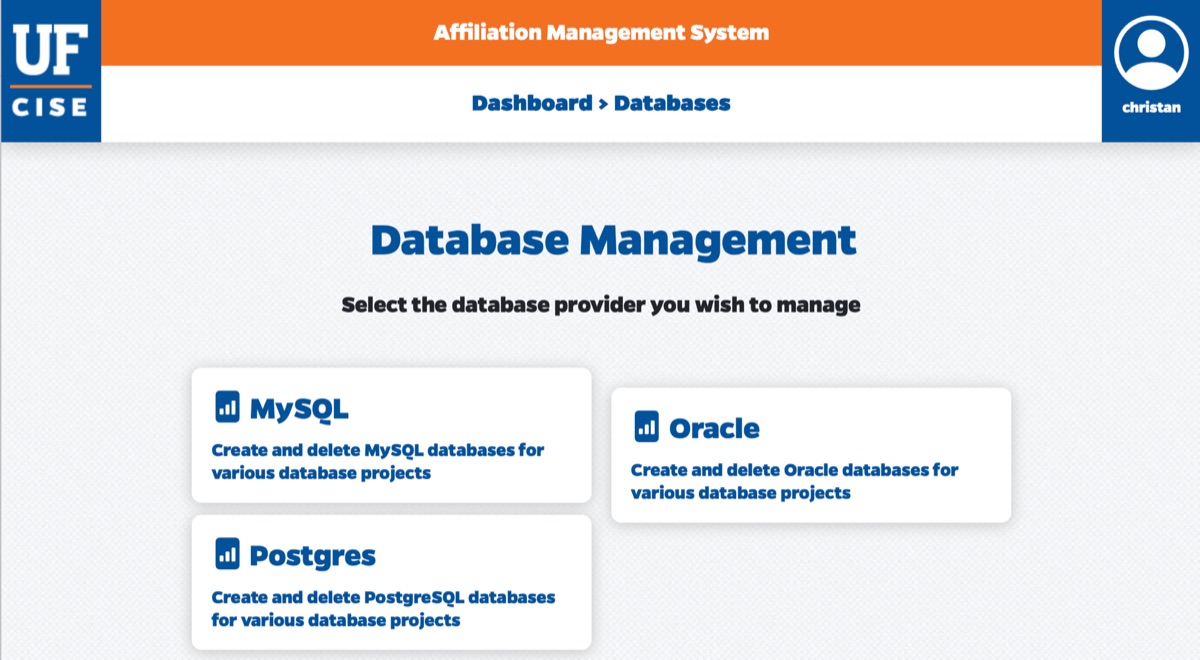
The CISE IT support documentation (GatorLink login required) covers the database services. Parts of it are out of date, so where the docs and the registration portal disagree, trust the portal.
Submission
- Make sure all six files (README, pyproject.toml, source.md, sample.csv, verify.py, .env.example) are committed and pushed.
- Tag the commit:
git tag v0 git push origin v0 - Submit the repo URL via Canvas Project 0 assignment.
Grading
Pass if all of the following are true:
- Repo exists at
https://github.com/<your_username>/cop5725fa26-project(private, withcegmeandrkc8626as Admins) - Tag
v0exists on the main branch README.mdhas your name, dataset choice, and one-paragraph summarydata/source.mdcites the dataset source and licensedata/sample.csv(or.parquet) exists with ≥ 100 rowssetup/verify.pyruns to completion with exit code 0 on the TA’s machine.env.exampleis committed and no.envappears anywhere in the repo history- Your dataset family matches the letter rule, or you have written instructor approval for an alternative
Pass = no grade impact. Fail = one full letter grade reduction at end of semester.
FAQ
Q: My dataset is too big for my laptop. What do I do? A: That’s expected. Project 1 will guide you through partial loading. For Project 0, you only need the 1000-row sample.
Q: My dataset requires authentication. A: That counts as “not freely accessible” — pick a different one or propose with the instructor’s approval. The course’s pedagogical model assumes all artifacts can be reproduced by anyone.
Q: OpenAlex is hundreds of gigabytes. Do I need to download it? A: No. Use the API with a field filter and a seeded sample; see Getting an OpenAlex slice.
Q: Can I pick the same slice as a classmate? A: Yes. The letter rule spreads the class across sources for variety, but your schema, queries, and writeups must be your own work either way.
Q: How do I connect to CISE PostgreSQL?
A: See Connecting to CISE PostgreSQL for account registration, SSH tunneling for off-campus access, and command-line usage with psql.
Errata
- August 26, 2026: The README requirement asking for a one-line semester plan now asks for one or two sentences of ideas you could explore with the data. The later project specs are not yet released, so a plan for the full semester is not something you can write yet.
- August 26, 2026: Added the Getting an OpenAlex slice subsection and a matching FAQ entry for the P–T family. A field filter plus a seeded API sample replaces any need to download the multi-hundred-gigabyte snapshot.